
Python
How to extract Screener.in results using Python?

FabTrader
Screener.in is a fantastic tool for stock market enthusiasts, offering powerful screening capabilities to filter stocks based on fundamental parameters. If you have ever wanted to extract your saved screen results programmatically, this Python utility will help you achieve that effortlessly.
In this guide, I will walk you through a simple Python scraper that fetches data from Screener.in and converts it into a structured pandas DataFrame.

See this Utility in action
Checkout this blog article below that shows this utility in action. I have used this tool to automate one of Shankar Nath's strategy that was back tested to fetch a whopping 115% return. A complex investing strategy, which otherwise could take many hours to scan, analyze and find suitable stocks for investments, is simplified and can be done with a single stroke of a button! That's how powerful this tool can be!
Prerequisites: Installing Required Dependencies
Before running the scraper, you need to install the following dependencies:
pip install beautifulsoup4==4.11.2
pip install openpyxl
pip install pandas
These packages allow us to parse web pages and manipulate tabular data with ease.
How the Screener Data Extractor Works
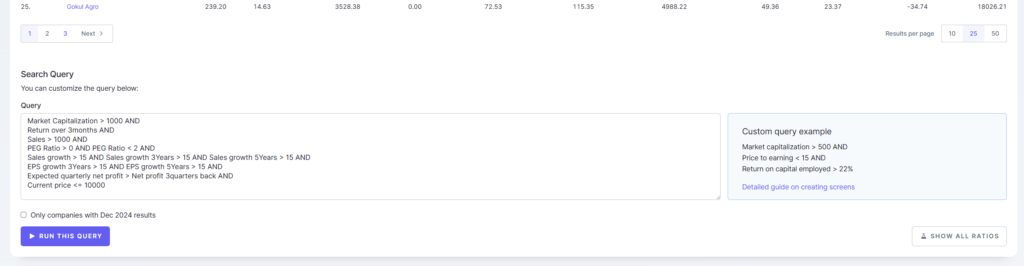
This utility takes the URL of your saved screen on Screener.in as input, iterates through paginated results, and extracts all stock data into a pandas DataFrame. The extracted data can then be saved into an Excel or CSV file for further analysis.
Key Features of the Utility:
- Extracts complete screen results from Screener.in
- Iterates through paginated results to fetch all available stocks
- Returns data in a pandas DataFrame
- Allows easy saving of data to an Excel or CSV file
Python Code for Extracting Screener Data
Here is the full Python script that performs the extraction:
"""
Screener.in results Extractor - Download screener results into a pandas dataset

-- Dependencies to be installed --
pip install beautifulsoup4==4.11.2
pip install openpyxl
pip install pandas

Disclaimer:
The information provided is for educational and informational purposes only and
should not be construed as financial, investment, or legal advice. The content is based on publicly available
information and personal opinions and may not be suitable for all investors. Investing involves risks,
including the loss of principal.

Note: This program runs longer than typical scrappers due to the complex
page structure of the website. This long-running aspect is normal and the
results will be displayed after a few minutes.
"""

import time
import pandas as pd

def fetch_screener_data(link):
    cache_index = None
    data = pd.DataFrame()
    current_page = 1
    page_limit = 100
    while current_page < page_limit:
        url = f'{link}?page={current_page}'
        all_tables = pd.read_html(url, flavor='bs4')
        combined_df = pd.concat(all_tables)

        combined_df = combined_df.drop(
            combined_df[combined_df['S.No.'].isnull()].index)

        if len(combined_df.index) < 26:
            data = pd.concat([data, combined_df], axis=0)
            break

        data = pd.concat([data, combined_df], axis=0)
        current_page += 1
        time.sleep(3)
    data = data.iloc[0:].drop(data[data['S.No.'] == 'S.No.'].index)

    return data


if __name__ == "__main__":
    pd.set_option("display.max_rows", None, "display.max_columns", None)

    # Fetch 3 month return
    screen_url = 'https://www.screener.in/screens/2115435/garp3months/'
    df = fetch_screener_data(screen_url)
    print(df)
Understanding the Code
- Fetching Data: The
fetch_screener_datafunction constructs the URL for each page and extracts tables usingpd.read_html(url, flavor='bs4'). - Handling Pagination: The loop iterates through pages until all stocks are fetched.
- Cleaning the Data: The script removes unnecessary rows and empty values.
- Adding a Delay: A 3-second
time.sleep(3)delay is introduced to prevent excessive requests to Screener.in. - Displaying the Data: The final extracted DataFrame is printed for verification.
Things to Keep in Mind
- Long Execution Time: The script takes longer to run because Screener.in’s page structure is complex. Be patient while it fetches all the results.
- Respect Website Policies: Avoid sending excessive requests in a short period to prevent getting blocked.
- Use Updated Dependencies: Ensure you have the latest version of
pandasandbeautifulsoup4for smooth execution.
Conclusion:
This Python utility is a simple yet effective way to extract Screener.in results for deeper analysis. Whether you are a retail investor, an analyst, or a data science enthusiast, this script can help you automate stock screening data extraction and save valuable time.
Give it a try, and let me know if you have any questions or suggestions!
Happy Investing! 🚀
More from Python
Finding the Most Liquid Equity ETFs in each Category using Python
Not all ETFs are created equal — especially when it comes to liquidity. While NSE provides a full ETF list, identifying the...
The Market’s Coiled Spring — Building the Momentum Squeeze Indicator in Python
Volatility doesn’t expand randomly — it contracts first. The Momentum Squeeze Indicator, popularized by LazyBear, is built on this simple but powerful...
Price Consolidation Boxes: Ranges, Breakouts, and Retests Using Python
Markets don’t trend most of the time — they pause, compress, and consolidate. Before every meaningful move up or down, price typically...